

“The future of coding isn’t typing line by line, it’s thinking line by line.”
And that’s exactly what AI code generators are here to do: help you turn your ideas into working code faster, smarter, and without the endless grind.
In 2026, whether you’re building apps, automating workflows, or experimenting with new languages, knowing the best free AI code generator tools can save you hours, reduce errors, and make coding feel less like a slog and more like creation.
And this is exactly why we want to introduce you to the best AI code generators in 2026.
What are AI code generators, and why do we need them
AI code generators are software tools that use machine learning models to write, suggest, or improve code automatically.
They help developers work faster by reducing repetitive tasks, catching errors early, and providing instant suggestions that make coding more efficient and less time-consuming.
In simple terms, an AI code generator acts like a coding assistant that understands natural language and turns it into working code.
If you’ve ever built a website, shipped a product, or debugged an issue at 1 a.m., then you’ll know it’s not just about “writing code.”
It’s the constant switching between tasks, remembering syntax, searching StackOverflow, fixing one bug only to meet another, and trying to keep up with new languages and frameworks.
A free AI code generator eases that pressure. It takes away the basic, repetitive load so your brain can focus on the real work that moves a project forward.
According to GitHub’s 2024 productivity report, developers using AI-powered coding tools completed tasks 55% faster than those who didn’t, with noticeably lower cognitive strain.
And that lines up with what Satya Nadella said when he described AI as “the next shift that removes the drudgery of work so people can focus on the soul of their job.”
For many builders today, that “drudgery” is the endless small code fixes that eat up hours. An AI tool saves that time.
In practice, this means you can generate a function in seconds, test an API without rewriting boilerplate, or get a clearer version of code you wrote last year but no longer remember.
How to use AI code generators
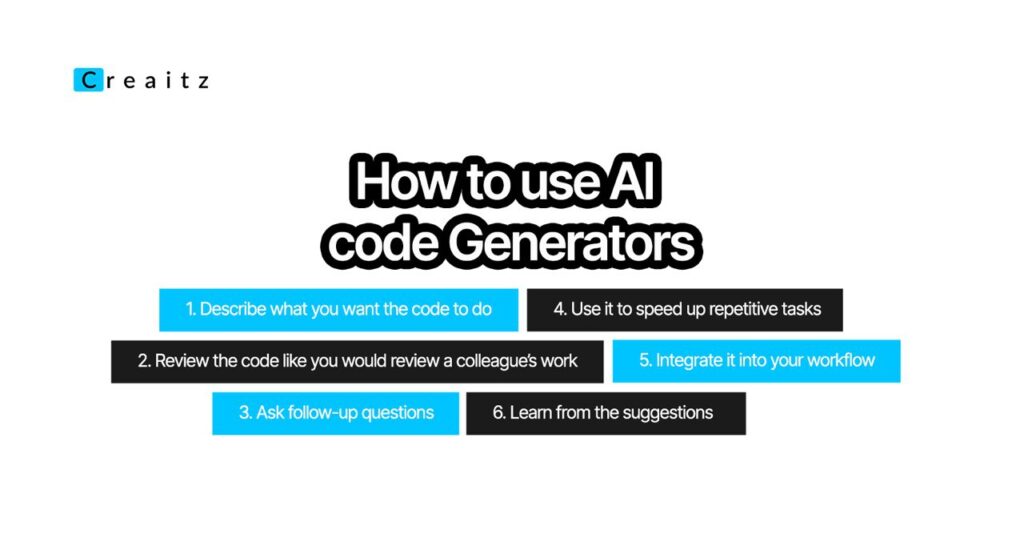
AI code generators are most effective when you use them with clear prompts, defined objectives, and a basic understanding of the code you want to produce.
To use an AI code generator, you typically describe what you want in natural language, review the generated output, and refine the instructions until they match your goal.
Now, let’s break it down:
1. Describe what you want the code to do
The clearer your instructions, the better the output. Instead of saying “write a login system,” something like “Write a Python login system that uses JWT authentication and includes email + password validation” produces far better results.
Explicit instructions improve AI coding accuracy when compared to vague requests.
2. Review the code like you would review a colleague’s work
AI tools are fast, but not perfect.
So you check the logic, test it, and ensure it fits your codebase.
This is important because even the best AI code generator can produce something that needs a quick tweak.
However, the tweaks take minutes, not hours.
3. Ask follow-up questions
Many people forget this part.
You can ask an AI tool to optimize, shorten, add comments, or explain a snippet line-by-line.
It’s completely normal to go back and forth. This is how professionals use the best free AI code generator, not once, but iteratively, refining until the code is clean and ready for deployment.
4. Use it to speed up repetitive tasks
Boilerplate code, documentation drafts, test cases, API samples, these are things that drain mental energy.
AI handles them extremely well.
Many developers spend almost 40% of their time on repetitive coding tasks.
Offloading this chunk frees you to focus on architecture, strategy, and problem-solving, the things that actually require your judgment.
5. Integrate it into your workflow
Whether you work in VS Code, JetBrains IDEs, browser-based editors, or cloud tools, most AI assistants plug in smoothly.
And once they’re part of your daily workflow, you stop “trying” to use AI and start naturally reaching for it because it just makes sense, especially during tight deadlines.
6. Learn from the suggestions
One underrated benefit: AI can help you grow faster.
Seeing multiple ways to write the same function exposes you to patterns you wouldn’t normally see.
For growing professionals, this is like having guided mentorship built into every project.
TOP FREE AI CODE GENERATORS

1. GitHub Copilot
GitHub Copilot is an AI-powered code assistant built by GitHub and OpenAI that helps you write code faster and with less friction.
It works directly inside your code editor and suggests entire lines, functions, or file structures based on what you’re typing.
Instead of switching between tabs to search for examples, you get real-time, context-aware suggestions that speed up development and reduce decision fatigue.
For beginners, it removes the fear of staring at a blank file, and for experienced developers, it automates repetitive tasks so they can focus on logic and architecture.
One of the reasons Copilot stands out is its ability to understand patterns in your project. As you write, it learns from your file structure, naming choices, and coding style.
This allows it to generate suggestions that feel natural and consistent with the rest of your work.
It doesn’t replace programming knowledge, but it makes the entire process smoother, faster, and easier to manage.
How to use it
- Install the extension: Add GitHub Copilot from the marketplace of your editor (VS Code, JetBrains, Neovim) and sign in with your GitHub account. Once active, it starts suggesting code instantly.
- Use natural-language comments: Describe what you want using plain English comments like “// fetch all products from database,” and Copilot will generate code that follows that instruction.
- Accept or cycle through suggestions: Press Tab to accept a suggestion or use keyboard shortcuts to view alternative suggestions until you find the one that fits your intent.
- Generate boilerplate faster: Start writing functions, classes, or routes and let Copilot complete the structure. This saves time on repetitive patterns like CRUD operations, loops, or component templates.
- Refactor or improve code: Highlight sections you want to clean up and let Copilot suggest shorter, clearer, or more efficient versions of the same logic.
When exploring a new framework or language, you can start by typing small comments describing the functionality you want.
Copilot will offer structured, working examples that help you understand the required syntax without constant searching.
2. Codeium
Codeium is a free AI-powered coding assistant designed to help developers write code more quickly and with fewer roadblocks.
It supports over 70 programming languages and integrates smoothly with popular editors like VS Code, JetBrains, Sublime Text, and even browser-based environments.
What makes Codeium stand out is that its core features, code completion, chat assistance, and search, are completely free, making it accessible to students, new developers, and teams working on a budget.
It also provides context-aware suggestions that match the style of the code you’re already writing, helping you stay consistent while speeding up the development process.
Another strength of Codeium is how well it handles multilingual projects. Whether you’re switching from JavaScript to Python or from HTML to backend logic, Codeium adapts quickly without feeling confused.
It’s also built with privacy in mind, offering an option for enterprise users to run the model locally, which is helpful for organizations concerned about source code security.
How to use it
- Install the extension: Add Codeium from your editor’s marketplace and activate it with a free Codeium account. It starts generating suggestions as soon as you begin typing.
- Leverage inline completions: Write the first few words of a function, class, or API call, and Codeium will auto-complete the rest with context-aware suggestions that align with what you’re building.
- Use Codeium Chat: Open the built-in chat inside your editor to ask questions about bugs, logic, or implementation ideas. It gives explanations and code examples based on the file you’re working on.
- Search your codebase: Use Codeium’s semantic search to quickly find functions, variables, or logic sections based on meaning, not just keywords. This is especially helpful in large projects.
- Generate boilerplate quickly: Let Codeium draft repetitive structures like routes, controllers, helper functions, or component templates so you spend less time on setup and more time on problem-solving.
If you’re working on a large project, use Codeium’s semantic search frequently.
Instead of scrolling through files or relying on exact naming, you can search by describing what the code does, making navigation faster and debugging easier.
Codeium remains one of the best free AI code generators because it offers robust features without forcing you into a paid plan.
3. CodeGeeX
CodeGeeX is a free, open-source AI code generator built to support multiple programming languages and provide developers with a flexible, community-driven coding assistant.
It was created by researchers to offer an accessible alternative to commercial AI coding tools, which makes it especially valuable for students, open-source contributors, and developers who prefer transparent, customizable systems.
CodeGeeX supports languages like Python, JavaScript, Java, C++, Go, and more, and it can even translate code from one language to another.
This makes it useful if you’re learning a new language or migrating an existing project into a different tech stack.
Because it’s open-source, developers can fine-tune it for specific use cases or even run it locally depending on their setup.
This gives more control over how the model behaves and how sensitive code is handled.
CodeGeeX is also known for generating clean starter code, suggesting function structures, and helping with repetitive tasks like loops, API wrappers, or utility functions.
Although it may not always match the polish of premium tools, it delivers reliable output, adapts well across languages, and provides a solid free option for anyone who wants AI support without subscription costs.
How to use it
- Install the extension or plugin: Add CodeGeeX through VS Code or supported editors. Once enabled, it starts offering suggestions based on the file you’re working on.
- Use inline completions: Begin writing a function or logic block and let CodeGeeX finish the rest. It fills in code structures using the context of your current file.
- Translate code between languages: Paste code from one language and use CodeGeeX to generate an equivalent version in another. This is helpful when learning or converting projects.
- Generate boilerplate quickly: Start typing patterns like initialization functions, API endpoints, or class structures, and CodeGeeX will complete them in a structured way.
- Experiment and customize: Since it’s open-source, advanced users can adjust the model or run local versions for privacy or specialized workflows.
If you’re learning a new programming language, write short comments describing what you want to build. CodeGeeX will generate working examples in that language, helping you understand the syntax more naturally.
CodeGeeX is a dependable free AI code generator, and it is a strong choice for anyone who values accessibility and transparency in their coding tools.
4. Replit Ghostwriter
Replit Ghostwriter is an AI coding assistant built directly into the Replit online IDE, making it one of the easiest tools for beginners and everyday developers to use.
Because Replit runs entirely in the browser, you don’t need to install any software or configure an environment. Ghostwriter starts helping you the moment you open a project.
It generates code, completes functions, explains errors, and helps you build apps quickly, all inside a workspace that feels simple and familiar.
For people learning to code or building small-to-medium projects, this convenience removes many technical barriers and lets you focus purely on creating.
One of the biggest strengths of Ghostwriter is how well it works alongside Replit’s multiplayer and deploy features.
You can write code with teammates, test it instantly in the same window, and deploy it with a single click.
Ghostwriter fits naturally into this workflow by suggesting improvements, catching mistakes, and generating boilerplate across languages like Python, JavaScript, HTML/CSS, Java, and more.
It’s especially useful for rapid prototyping, if you want to build a calculator, a simple API, or a small web app, Ghostwriter helps you get a working version within minutes.
How to use it
- Open a Replit workspace: Create a new project in Replit, and Ghostwriter becomes available automatically. There’s no setup or installation needed.
- Use inline completions: Start typing code, and Ghostwriter will generate full lines or functions that match what you’re trying to build. Press Tab to accept suggestions.
- Ask Ghostwriter questions: Use the built-in AI chat to request explanations, debug errors, or get examples of how to implement specific features. It responds based on your current code.
- Generate starter templates: Type comments like “// create a login form” or “# build a basic Flask app” and let Ghostwriter draft the structure so you can adjust it to your needs.
- Debug and refine code: When you see an error, ask Ghostwriter to explain the issue and provide a corrected version. This is helpful for both learning and speeding up troubleshooting.
Replit automatically runs your code as you work, so pair this with Ghostwriter by testing small pieces often.
Let Ghostwriter generate the first draft, run it immediately, and repeat until your feature works exactly how you want.
Replit Ghostwriter remains one of the most accessible free AI code generators because it removes setup friction, works inside a beginner-friendly IDE, and helps you move from idea to working code in the shortest time possible.
5. Tabnine
Tabnine is an AI code completion tool designed to help developers write code faster while keeping privacy and security.
Unlike many cloud-dependent AI tools, Tabnine offers the option to run its models locally, which means your code never leaves your device. This makes it especially appealing to developers working on sensitive projects or teams with strict data policies.
It supports a wide range of programming languages and integrates smoothly with editors like VS Code, JetBrains IDEs, Sublime Text, Neovim, and more.
Its suggestions are fast, accurate for common patterns, and lightweight enough that it doesn’t slow down your workflow.
One of Tabnine’s strongest qualities is its focus on predictable and stable code completions.
Instead of generating long or speculative blocks of code, it prioritizes short, practical suggestions that fit naturally into what you’re already typing.
While it isn’t designed to produce full applications, it shines in everyday productivity and ensures developers stay in control of their code.
How to use it
- Install the extension: Add Tabnine from your editor’s marketplace. Once installed, choose whether to run it locally or through the cloud, depending on your preference for speed or privacy.
- Use inline completions: Begin typing a function, variable name, or pattern, and Tabnine will offer short, relevant suggestions based on your file’s context.
- Rely on consistent patterns: Use Tabnine to complete repetitive coding structures, loops, conditional blocks, and method calls, so you spend less time typing and more time focusing on logic.
- Adjust personalization settings: Tabnine can adapt to your coding style over time. Activate personalization so it learns naming conventions, common function patterns, and your typical structure.
- Work offline when needed: If you enable local mode, Tabnine continues to work even without an internet connection, which is useful for secure or remote environments.
When working on large codebases with many repeating patterns, let Tabnine handle the small completions.
This way, you won’t have to type out every detail.
Tabnine is one of the best free AI code generators for developers who value control, speed, and privacy, offering reliable code completions without requiring sensitive data to leave their devices.
6. Qodo
Qodo is a lightweight, browser-based AI code generator designed for developers who want quick, clean code suggestions without dealing with complex installations or heavy IDE extensions.
It focuses on simplicity: you open the workspace, start typing, and Qodo instantly generates code, fixes errors, and explains concepts directly in your browser.
Because it runs online and doesn’t require setup, it’s a great option for beginners, students, or anyone who wants to experiment with coding without configuring local environments.
It supports common languages such as JavaScript, Python, HTML/CSS, and Java, and it provides clear explanations of the code it generates.
This makes it not only a code generator but also a learning companion.
If you write a comment describing what you want, Qodo produces a draft you can refine, making the early stages of building an app or script much easier.
How to use it
- Open Qodo in your browser: No installation or setup is required. Simply create a workspace online and begin typing your code.
- Use inline suggestions: Start writing functions, logic blocks, or component structures. Qodo will generate relevant suggestions you can accept or edit.
- Write natural-language comments: Describe what you want to build, such as “// create a function to format dates,” and Qodo will produce a structured code block based on that instruction.
- Use AI explanations: Highlight confusing code or errors and ask Qodo to explain what’s happening. It gives simple breakdowns that help you understand the logic better.
- Test as you go: Because Qodo is browser-based, you can run your code immediately. This helps you see how generated suggestions behave in real time.
When learning a new syntax or trying out a new framework, use Qodo to generate small examples by writing short comments.
Then run those examples immediately in the workspace to reinforce understanding through practice.
Qodo stands out as a simple, accessible, and beginner-friendly free AI code generator. It’s great for learning, quick prototyping, or building small projects without the friction of downloads or setups.
7. Cursor
Cursor is an AI-powered coding assistant designed to help developers navigate and edit entire codebases more efficiently.
Unlike simple line-by-line code completion tools, Cursor works at the project level, allowing you to make multi-file edits, refactor code, and implement changes across repositories with AI assistance.
It integrates with popular editors like VS Code and provides suggestions that are context-aware, not just based on a single file, which makes it especially useful for medium to large projects where maintaining consistency is crucial.
One of Cursor’s main advantages is how it handles large-scale refactoring and code improvements.
You can ask it to update function names across all files, replace patterns, or convert code structures without manually editing dozens of files.
It also helps with repetitive tasks such as generating boilerplate code, creating helper functions, or suggesting improvements in loops and conditional logic.
Cursor is not just for speeding up typing; it’s designed to help developers work smarter, reduce errors, and maintain clean, consistent code throughout their projects.
How to use it
- Install the extension: Add Cursor to your VS Code or supported IDE. Once installed, it connects directly to your workspace and starts offering suggestions based on the context of your project.
- Use multi-file editing: Highlight a function, variable, or code block and instruct Cursor to update or refactor it across all files in your repository. This saves significant time in large projects.
- Accept or cycle through suggestions: When Cursor provides suggestions for edits or new code, you can review them one by one and accept the ones that fit your project’s style and requirements.
- Generate boilerplate or helper functions: Use Cursor to create repetitive structures or utility functions, reducing the need to manually write common patterns.
- Ask for explanations or improvements: Cursor can clarify complex code blocks, suggest optimizations, or provide more readable alternatives, helping you understand and improve your code simultaneously.
When you’re working on a large codebase, use Cursor to handle repetitive updates and maintain consistency across files.
It’s especially useful for refactoring legacy code or implementing new features without introducing errors.
Cursor is a top free AI code generator for developers focused on project-level efficiency, consistency, and smarter coding, making it ideal for managing medium to large-scale codebases.
FAQs on Top Free AI Code Generators in 2026
1. Can I use these AI code generators without installing anything?
Yes! Some tools like Replit Ghostwriter and Qodo work directly in the browser, so you can start coding instantly without installing software.
2. Are these AI code generators safe for my private projects?
Many, like Tabnine and CodeGeeX, offer local modes or open-source versions that keep your code private and secure.
3. Do I need to know AI or advanced tech to use them?
Not at all. Most of these tools integrate right into your editor and work as you type, so basic coding knowledge is enough to get started.
4. Will AI code generators write entire projects for me?
They can generate code snippets, functions, and boilerplate, but you still need to guide them and review the code to build a full project.
5. Can these AI tools handle multiple programming languages?
Yes. Most top free AI code generators support many languages, like Python, JavaScript, Java, C++, and more, so you can switch between projects easily.
Now Stop Typing, Start Creating
AI code generators are a practical way to save time, reduce repetitive tasks, and get your ideas into action faster.
The right free AI code generator will help you focus on solving problems and building what actually matters, instead of getting stuck on minor code details or endless debugging.
If you want more tips like this, discover the latest AI tools, and see how digital professionals are using them to work smarter, then join us at the Creaitz community.
It’s a space where you can learn, share, and pick up practical hacks that make coding smoother and more productive.
Also Worth Reading:
