

Open Bing Webmaster Tools and you can investigate a question your traffic report leaves unanswered: which pages are appearing as sources in supported AI answers?
Microsoft’s AI Performance report gives you citation counts, cited URLs and grounding-query information. For your content planning, that creates a useful starting point. You can identify pages already contributing to AI answers and examine the subjects associated with that activity.
Getting value from the dashboard depends on understanding its definitions, coverage and limits.
Affiliate disclosure: This article contains affiliate links to Semrush. If you sign up through them, we may earn a commission at no extra cost to you.
What Bing AI Performance Measures
Microsoft introduced AI Performance in February 2026. Its supported experiences include Microsoft Copilot, AI-generated summaries in Bing and select partner integrations.
Sign in to Bing Webmaster Tools, select your website and open AI Performance.
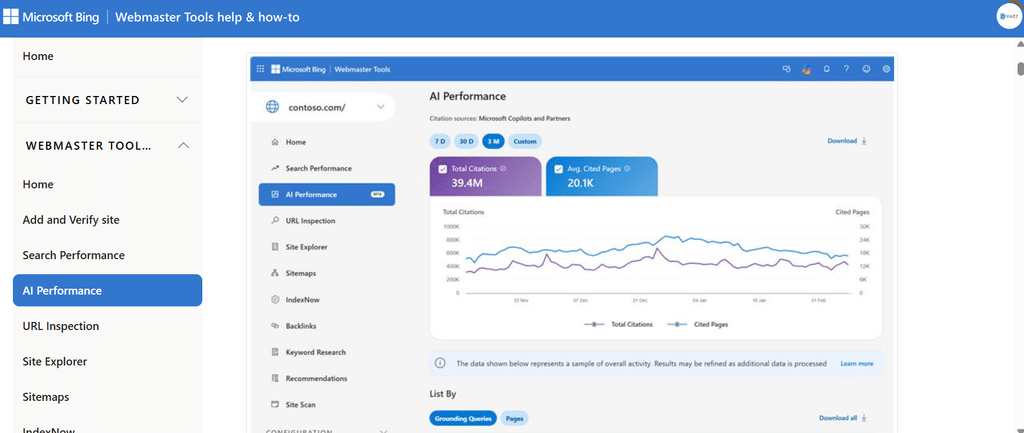
Begin by choosing a date range and reading the main measures:
| Measure | What you can learn |
| Total Citations | How often your content was displayed as a source within the report’s coverage |
| Average Cited Pages | The average number of unique pages from your website cited per day |
| Grounding Queries | Generalised phrases associated with citation activity |
| Page-Level Citations | Which individual URLs received citations |
| Citation Timeline | How recorded citation activity changed during the selected period |
A citation records a visible reference to your content. Clicks, visits, enquiries and sales require their own measurements.
Keep the date range beside any figures you export so you can interpret them later.
Follow a Grounding Query to the Page Behind It
Grounding queries help you investigate the subjects associated with your citations.
According to Bing’s documentation, these phrases summarise aggregated activity. You cannot reconstruct someone’s exact question or complete conversation from them.
Select a grounding query to inspect its associated cited pages. You can also start with a page and review the queries connected to it.
Suppose you publish tutorials about email marketing and see citation activity associated with “newsletter automation.” Open the cited URL and examine what it explains:
- Does it identify the tools and account requirements?
- Are the setup steps current?
- Does it address common problems?
- Can you verify the examples and claims?
- Is there a clear next step for someone who needs more help?
This turns a dashboard entry into a specific editorial review. You can preserve useful explanations, correct outdated details and document the changes.
Our article on building a GEO content strategy explains how to prioritise that work across your existing pages.
When Topics Portfolio Appears
Microsoft added Topics Portfolio in October 2026. This beta groups grounding queries into broader themes and provides additional context for content planning.
If your website has sufficient data, you may see it alongside Citations & Pages.
Its measures include:
- Topic Size: approximate citations across all sites within the topic.
- Sites Cited: the approximate number of sites appearing for queries in that topic.
- Queries: the approximate number of distinct grounding queries.
You can also investigate opportunity queries where other websites appear and yours does not.
Review each suggestion against your expertise and audience. A query about a competitor’s product may appear as an opportunity even when it has little relevance to your offer.
The classifications are AI-generated, and the figures are approximate. Smaller websites may have insufficient activity for the feature to appear.
Use the topics to organise your research and identify questions worth investigating.
Read Bing AI Performance Trends With Their Limits in View
Citation activity can change as demand, content, models and partner systems change.
If citations rise after you update a tutorial, record both events. Establishing that your edit caused the increase requires further evidence.
Bing also explains that its data is sampled and summarised. Low-volume activity may be absent, and totals can differ between views because of sampling and processing.
For your monthly review:
- Keep comparable date ranges.
- Export the available page, query and timeline data.
- Record important website changes.
- Investigate meaningful shifts across several observations.
- Label conclusions that remain uncertain.
If a priority page has little activity, our Bing SEO and AI visibility guide covers the indexing and crawl checks you can perform before making content changes.
Extend Your Review Across Other AI Experiences
Your customers may also encounter your brand through ChatGPT, Gemini, Google AI Mode and AI Overviews.
You can extend your research through Semrush’s Visibility Overview, which provides brand-mention and citation insights across those platforms within its prompt database.

Inspect the cited sources and available responses. You may find that your website supplies an answer, or that a third-party page shapes how your brand appears.
Semrush One combines the SEO and AI Visibility toolkits. You can try it free for seven days and give your next reporting meeting fewer unanswered questions.

Keep each source’s metrics separately labelled. Bing citations and Semrush brand mentions have different definitions and coverage; adding them together would produce a misleading total.
Give Every Dashboard Finding a Job
A useful review should leave you with a manageable action.
You might refresh an outdated tutorial, investigate an unexpected cited page, check an indexing issue or research a topic connected to your services. Record why you chose that action and what you will review afterwards.
Bing AI Performance gives you evidence about your content’s participation in supported AI answers. Combine that evidence with broader visibility research, website analytics and customer enquiries to guide your next investment.
Start with the pages already receiving citations. Understand their contribution, keep their information accurate and use what you learn to make your next content decision more deliberate.
