
You typed 4 lines.
Then your thumb hit the wrong key.
Autocorrect changed Sir to Soup.
NEPA took light.
As if that wasn’t enough,your data finished.
That client moved on. Someone else already got the job.
Does this sound familiar?
This is the small, silent thing killing Nigerian freelancers.
And nobody talks about it.
It’s not a lack of skill.
Neither is it a lack of ideas.
The tiny keyboard on your phone is eating your money one slow reply at a time.
Here is the fix, and it’s completely free.
The tool is already on your phone.
By the time you finish reading,
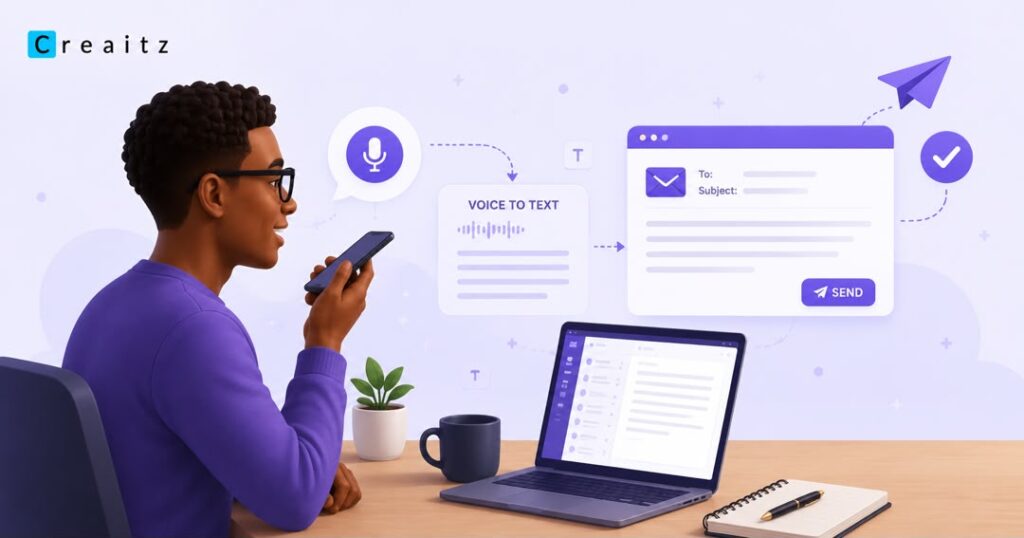
you’ll have sent your first email using nothing but your voice, faster than your fingers could ever type it.
Why Your Phone Keyboard Is Costing You Money
Be honest with yourself.
How long does it take you to reply to one client email?
Twenty minutes? Thirty?
Now imagine a client who expects a reply in five minutes, or hires someone else.
You’re not slow because you’re lazy.
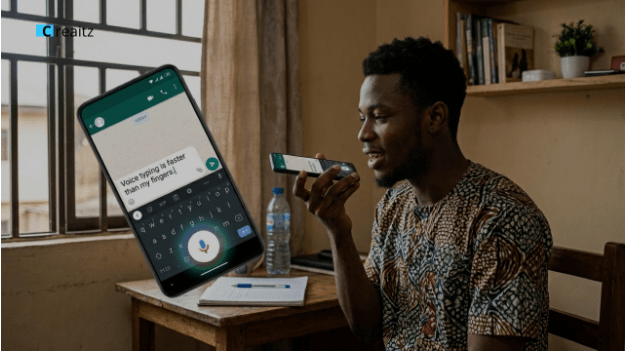
You’re slow because thumbs weren’t designed to type 200 words on a 5-inch screen.
A 2019 study by researchers at Aalto University and ETH Zürich found the average smartphone user types about 19 words per minute.
Speaking is different.
Most people speak around 150 words per minute, about 8 times faster than typing on a phone.
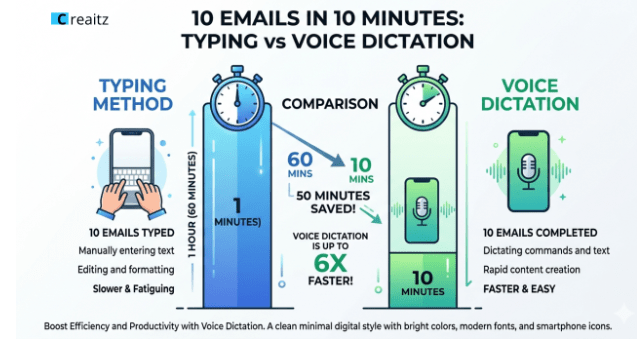
A Stanford study also found that voice dictation produced text 3 times faster than touchscreen typing, with similar accuracy after light editing.
What does this mean for you?
A 200-word email that takes 30 minutes to type can be spoken and polished in under 2 minutes.
The problem isn’t your typing speed.
It’s the constant stop-and-fix loop.
Voice removes that bottleneck, so you reply faster without changing your skills.
What Voice to Text for Business Really Means
Voice to text for business is any tool that listens to you speak and turns your words into typed text you can send to a client, post on Instagram, or paste into Gmail.
There are 3 types
- Live dictation:
Where words appear as you talk, like G-board and Google Docs.
- Record then transcribe:
All you need is to record first, then the tool converts it after, like Otter and Whisper.
- Voice plus AI cleanup
Where you speak rough thoughts and AI polishes them, like ChatGPT voice mode, and it’s actually free.
For a Nigerian freelancer with little data and no laptop, live dictation through Gboard is your free starting point.
Business emails follow patterns: greet, state the point, ask for action, then close.
As simple as that.
Typing forces you to think about each letter.
But speaking lets your brain stay on the message.
Set Up Voice Typing on Your Phone (5 Minutes, Free)
Skip this and your dictation will write nonsense.
Do it once, the right way and you are set for life.
- Confirm you have Gboard, already on most Tecno, Infinix, Samsung, and Itel phones.
- Check any chat box for a small G or mic icon, or install it free from the Play Store and set it as default.
- Open Settings, Languages and Input, Gboard, then Languages, and add English UK or English US.
- Turn on voice typing inside Gboard settings, then enable Faster voice typing or On device voice recognition too.
This is the secret weapon, the AI now runs locally on your phone.
Yeah, NEPA can take the light, data can finish, but you’ll still send replies.
Test It Right Now
Pause reading.
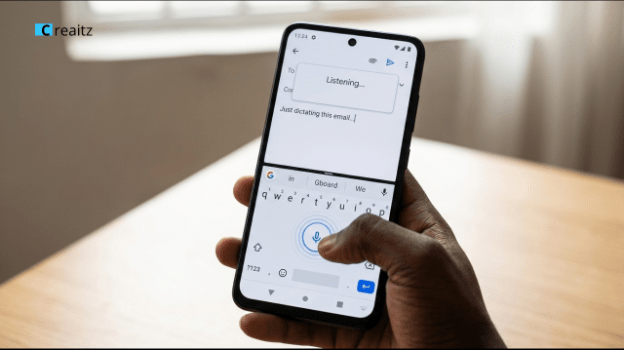
Open your WhatsApp right now, tap any chat box, find the mic icon near the keyboard, and say,
“Hello, this is a test message. Comma. Voice typing is working perfectly. Full stop.”
Notice you said the punctuation out loud.
That’s the trick, the keyboard turns “comma” into a real comma automatically.
If the words come out right, you are ready. If it came out as gibberish, jump to the accent fixes below.
The 10 Emails in 10 Minutes Workflow
Built for one phone, low data, and zero paid tools.
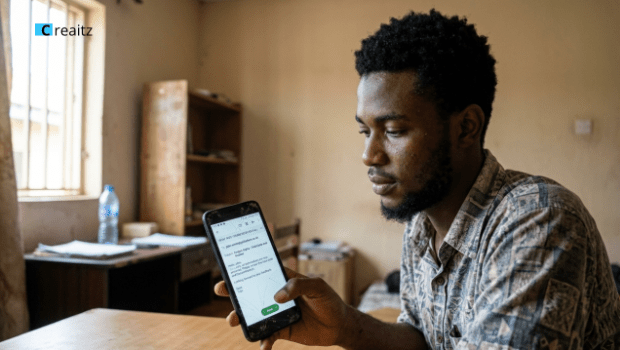
Capture, 60 seconds.
Open Gmail, tap Compose, and dictate the subject and body without stopping to fix mistakes, saying comma, full stop, new paragraph as you go.
Clean, 30 seconds.
Read the draft once, fix the 2 or 3 misheard words, capitalize the client’s name, delete filler.
Tap send and move to the next email.
Total per email is about 90 seconds, so ten emails in 10 minutes is realistic from day one.
Fix Voice Typing for Nigerian Accents
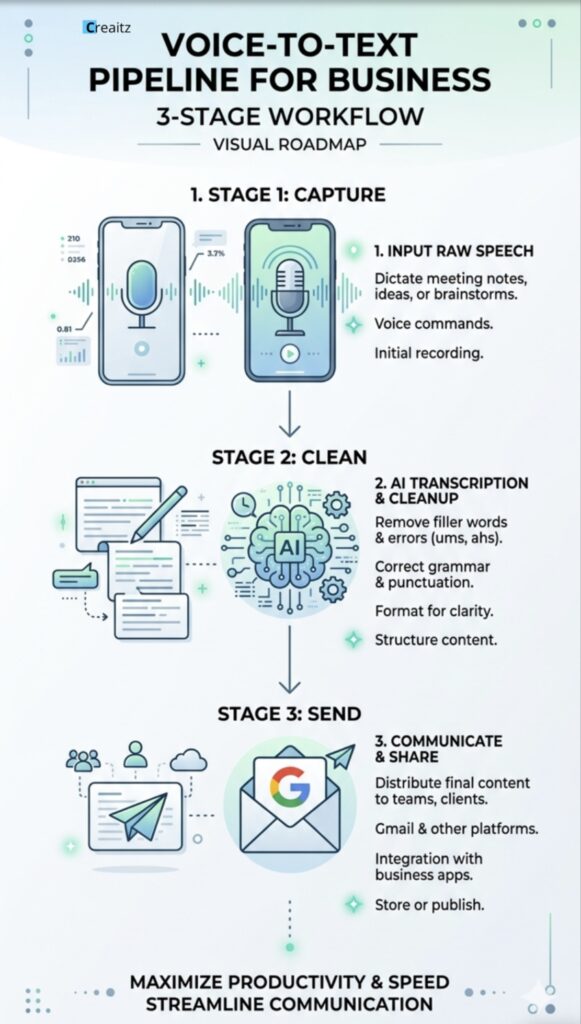
Most articles pretend voice typing works the same for everyone.
It doesn’t, until you set it up right.
Here are 5 habits that can boost your accuracy by 30 percent.
- Hold the phone one palm width from your mouth.
- Slow down by 20 percent, like explaining something to your aunty.
- Pronounce the last consonant hard: “Project,” not “projeh.”
- Use full names first, like Chinedu instead of Chichi.
- Avoid Pidgin. The keyboard hears “I will get back to you” 100 percent of the time.
When the Keyboard Refuses to Cooperate
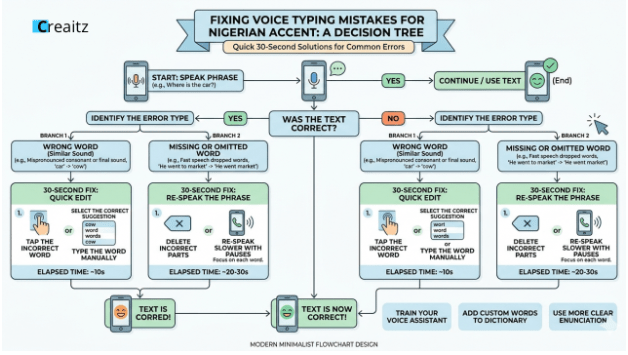
Whenever the voice typing starts acting up.
Just close the Gmail completely and reopen, switch from English Nigeria to English UK for that email, or restart your phone to clear its memory.
If none of that works,
use Google Docs voice typing at docs.new in Chrome, under Tools then Voice typing.
Dictating in Lagos Noise (Generators, Traffic, Market)
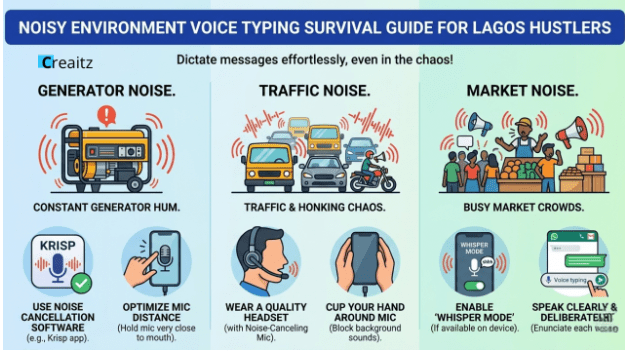
Pretending Lagos is a quiet office is a lie.
Here are two fixes that actually work
- The ₦300 earpiece trick.
Any cheap earpiece with a mic hangs near your collarbone and ignores background noise, taking accuracy from 60 percent to 90 percent instantly.
- Whisper mode on Gboard.
Tap the mic, then the settings gear, then Whisper or Quiet input, and dictate at half volume in a noisy danfo.
Free vs Paid Voice Tools (Honest Breakdown)
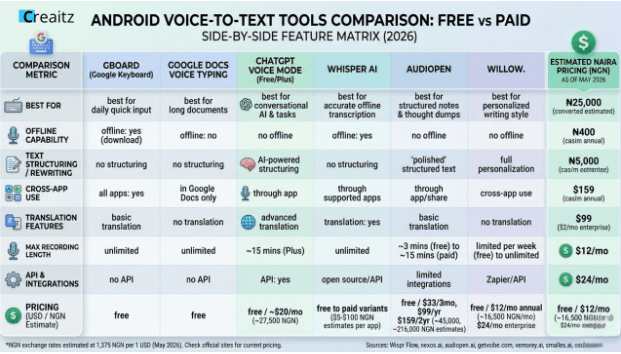
You don’t need to pay anything to start.
The free stack, Gboard for short emails, Google Docs for long drafts, ChatGPT for AI cleanup, and Otter.ai for meetings, costs zero Naira.
Paid tools are for later.
AudioPen runs about ₦150,000 a year for polished output styles, while Willow Voice and Wispr Flow cost ₦18,000 to ₦20,000 a month but it only works on Mac, Windows, or iPhone, not Android.
Don’t spend a single Naira on any of these until your income justifies it.
| Tool | Cost | Works On Android | Best For |
| Gboard Voice Typing | Free | Yes | Quick replies, short emails |
| Google Docs Voice Typing | Free | Yes (Chrome) | Long drafts, proposals |
| ChatGPT Voice Mode | Free | Yes | Voice plus AI cleanup |
| Otter.ai Free | Free up to 300 min | Yes | Meeting notes to email |
| AudioPen | ₦150,000/year | Yes | Polished output styles |
| Willow Voice | ₦18,000/month | No | Desktop power users |
6 Business Email Templates You Can Dictate Today
Steal these.
Read one out loud once, then dictate it exactly, saying comma, full stop, and new paragraph in the right spots.
- Client follow up
“Just checking in on the proposal I sent last Tuesday. No pressure. Let me know if you have questions. Warm regards, [your name].”
- Accepting a project
“Yes, I would love to take this on. I can start Monday and send the first draft by Friday. Please send the brief. [your name].”
- Cold outreach
“I noticed your last 5 captions could pull more orders with small tweaks. I would like to send a free rewrite, no obligation. Should I send it? [your name].”
- Sending an invoice
“Attached is this month’s invoice, total [amount]. Pay through Opay, Moniepoint, or bank transfer. Let me know once processed. [your name].”
- Declining a job
“Thank you for thinking of me. After the timeline, I am not the right fit this time. I would love to work together in future. [your name].”
- The holding reply
“Got your message. Looking into it now, full reply by [time or day]. Talk soon, [your name].”
If you want the full cold outreach playbook, See how to land your first foreign client from your phone
Pause here.
Pick one.
Open Gmail, dictate it to a real person in your contacts, and send it.
Yes, right now.
The 30-Second AI Cleanup Trick
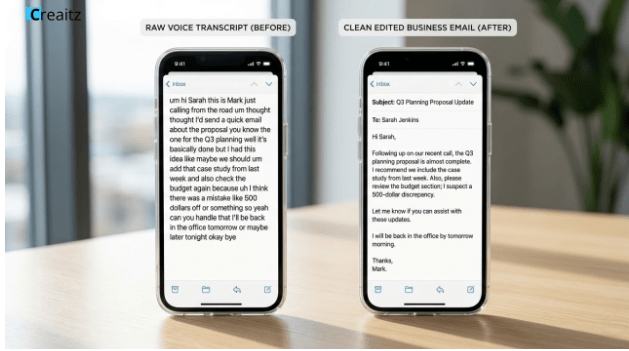
Sometimes your dictation comes out messy.
Open ChatGPT, paste your raw dictation, and type this prompt.
“Clean up this voice to text transcript into a polished, professional business email.
Keep my voice and tone.
Fix grammar and punctuation.
Don’t add fake details.
Here is the transcript, [paste your text].”
ChatGPT returns a clean email in 5 seconds. Copy, paste, send. Cost, zero Naira.
Mistakes That Will Wreck Your Dictation (And the 30-Second Fix)
Avoid these.
Most beginners make at least one of these mistakes.
- Dictating with no plan, instead of pausing 5 seconds to think it through.
- Editing mid-dictation instead of speaking the whole email first.
- Skipping the proofread. Voice typing is 95 percent accurate, not 100.
Don’t quit after one bad attempt.
Day 1 may feel awkward.
But day 7 feels faster than typing ever was.
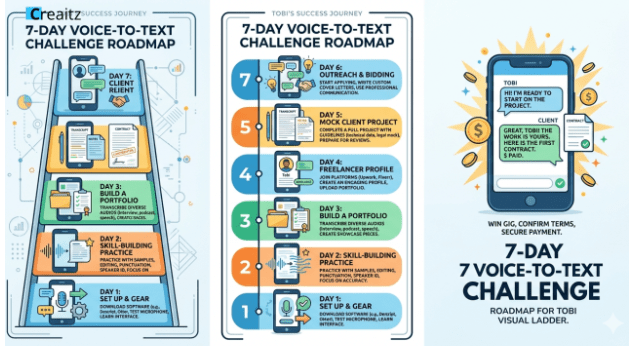
Your 7-Day Voice to Text Challenge
By day 7, you’ll have used your voice to send a paid client email, ahead of 95 percent of Nigerian freelancers.
- Day 1, install Gboard, enable voice typing, and test it in WhatsApp
- Day 2, dictate the follow up template to anyone in your contacts
- Day 3, send 5 voice typed emails to friends and family to build muscle
- Day 4, dictate one rough email and run it through the ChatGPT cleanup prompt
- Day 5, send the cold outreach template to 3 small Nigerian brands on Instagram, free rewrite, no payment needed
- Day 6, follow up with anyone who saw your message but did not reply
- Day 7, when a brand replies positive, use the accepting or invoice template to close the deal
That’s your first $50 to $100, sent purely through voice, from your phone, no laptop or paid tools.
How Different Nigerian Freelancers Are Using This
To make this real, here’s what some Nigerian hustlers are doing with voice to text for businesses right now.
- Freelance writers: Dictating first drafts of articles in 15 minutes instead of 90. Then editing for 30 minutes. Total time per article cut by 60%. If you want to learn the writing skill itself, start with the Creaitz copywriting starter pack for Nigerian beginners, don’t worry it’s free.
- Ecommerce sellers (Jiji, Jumia, Instagram): Replying to 30 customer DMs in 20 minutes during their commute on a danfo bus. Earphones with mic. Nobody knows.
- Virtual assistants: Sending the morning batch of emails to clients in different time zones before the client wakes up. Voice typed while making breakfast.
- Coaches and tutors: Recording feedback for students as voice notes, then converting to written feedback for parents. Same content, two formats, half the work.
- Designers: Sending client revisions and explanations as dictated emails instead of trying to type complex creative feedback on a tiny keyboard. If UX/UI design is your jam, you might want to start here.

Frequently Asked Questions
- Is voice to text for business really free on Android?
Yes. Gboard comes pre-installed on most Android phones, Google Docs, and ChatGPT both give you free voice typing too.
- Will voice typing understand my Nigerian accent?
Mostly yes, once you set the language to English Nigeria or English UK and speak slightly slower.
Accuracy jumps from around 65 percent to over 90 percent.
- Can I use it when my data is finished?
Yes. Turn on device voice recognition in Gboard settings, and it runs entirely on your phone with no internet needed.
- How do I add punctuation while dictating?
Say it out loud. Comma for a comma, full stop for a period, question mark for a question mark, new paragraph for a line break.
- Is my voice data safe with these free tools?
Gboard’s offline mode keeps audio on your phone only, and none of the free tools ask for your card, BVN, or bank details.
Your Next Step Right Now
When you’re ready for the full system, the templates, and the community, Join Us Here.
Your time is too expensive to keep typing on a tiny keyboard.
Your fingers are too tired. And your clients are waiting.
Spend those 2 hours sending more pitches.
Replying to more clients.
Closing more jobs.
Make Creaitz your go-to source on Google for everything that helps Nigerian beginners earn online from their phone.
Bookmark Creaitz Community on your browser today.
Your first $50 is not 6 months away.
It’s 10 minutes away.
Now, start dictating.
