

Affiliate disclosure: This article contains affiliate links to Semrush. If you sign up through them, Creaitz may earn a commission at no extra cost to you.
Your portfolio explains your services clearly. Your booking page looks polished. Your course landing page has a prominent enrolment button.
But could an AI assistant navigate those pages and help someone take the next step?
That question is different from whether Google can index your website—or whether ChatGPT mentions your brand.
For freelancers, designers, developers and digital marketers, agentic browsing introduces another practical consideration: can software interact with the website you built for people?
What is agentic browsing?
Agentic browsing involves an AI agent using a website to carry out a task on someone’s behalf. That might mean comparing services, finding an available appointment or navigating a registration process.
Google explains that browser agents may use screenshots, the page’s underlying structure and its accessibility tree to understand what is on screen and how to interact with it.
A website can therefore contain useful information while still making the next action unnecessarily difficult.
Think of a freelance consultant’s booking page. A visitor might recognise that a calendar icon opens appointment slots. An agent may struggle if that icon has no accessible name and the available dates appear only after an unpredictable interaction.
The problem is not the consultant’s expertise. It is the interface.
What Lighthouse’s Agentic Browsing category checks
Google’s Lighthouse documentation describes an experimental Agentic Browsing category covering machine interaction. Testing requires Chrome 150 or later, while WebMCP audits require registration for the WebMCP origin trial.
Its checks include:
- WebMCP integration: whether a website exposes supported tools and whether their definitions meet technical requirements.
- Agent-centric accessibility: whether interactive elements have meaningful names, valid roles and an understandable accessibility structure.
- Layout stability: whether elements move unexpectedly while an agent is trying to interact.
- Discoverability: checks involving an optional llms.txt file.
Unlike familiar Lighthouse categories, this category does not provide a weighted score out of 100. It uses pass ratios, individual audit results and informational signals.
Start with one valuable journey
You do not need to redesign your entire website around an emerging protocol.
Choose one journey that matters commercially:
- A prospective client finding your services and requesting a quote.
- A learner comparing courses and beginning registration.
- A newsletter reader finding the correct subscription form.
Write down the intended outcome, then walk through each interaction.
For a quote request, check whether the service descriptions are clear, the contact button has a meaningful label, the form fields explain what information is required, and submission produces an understandable confirmation.
This creates a useful test even before you have access to the experimental Lighthouse category.
Fix unclear interactions before adding new technology
Begin with improvements that also help human visitors:
Use meaningful labels. “Request a design quote” communicates more than an unexplained icon.
Make forms understandable. Give fields proper labels and make validation errors specific.
Keep important controls stable. A button that moves when an image loads creates uncertainty during an interaction. Lighthouse explicitly considers layout shifts relevant to agentic browsing.
Make the outcome visible. After a form submission, provide a clear confirmation rather than leaving the visitor—or agent—to guess what happened.
Alongside this page-level review, use Semrush’s Site Audit to identify broader technical issues such as broken links, crawlability problems and HTTP errors. Scheduled recrawls can help you check whether problems return after website changes.
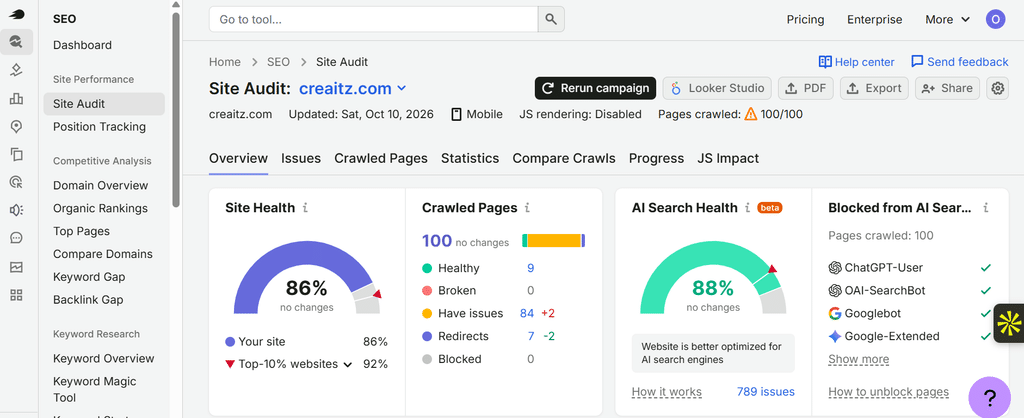
Keep the roles separate: Site Audit supports technical maintenance. It does not establish that an agent successfully completed your booking or registration journey.
Don’t turn llms.txt into another SEO shortcut
The inclusion of llms.txt in an experimental audit can sound like a new visibility requirement. That would be the wrong conclusion.
Lighthouse’s documentation says the file is optional: if it is absent and returns a 404, the audit is marked Not Applicable. Server errors when retrieving it are treated differently.
Separately, Google Search says it does not use these special AI text files for inclusion in its search experiences.
An experimental browser-agent check and Google Search eligibility are not the same thing.
Measure interaction and visibility separately
After improving a journey, repeat the same task and record what changed. Did the form become easier to understand? Did the moving button stop shifting? Could the intended action be completed?
Then examine discovery separately.
In Semrush’s Visibility Overview, you can inspect reported brand mentions, cited pages and AI responses within the platforms and database available in that report.

Those observations answer a visibility question—not a usability question. A citation does not prove successful interaction, and a successful interaction does not guarantee a citation.
For digital professionals, the sensible sequence is straightforward: make the journey usable, maintain technical health, and monitor discovery without confusing the three.
To support the technical and visibility checks, you can try Semrush One free for seven days. It combines the SEO Toolkit and AI Visibility Toolkit; access and limits depend on the plan. Neither a subscription nor an audit guarantees AI citations or successful agent interactions.
