

Your website opens normally. Your articles are published. Your robots.txt file appears to allow crawling.
Yet a search crawler might receive something different: an access-denied response, a security challenge or a page without the content you expected.
Before rewriting articles to improve AI visibility, check whether the relevant crawlers can retrieve them.
For marketers, developers and website owners, this is a question of sequencing: verify access, then investigate content performance.
Why Robots.txt is Only Part of the Check
Robots.txt communicates crawling instructions. It does not override every security rule between a bot and your website.
A request may also pass through a content delivery network, web application firewall or hosting security layer. Those systems can treat automated requests differently from ordinary browser visits.
Cloudflare, for example, provides separate controls for bots classified as Search, Agent and Training, with blocking options that vary by configuration.
That does not mean every Cloudflare website blocks every AI crawler.
It means your site’s actual configuration matters more than a general statement about the platform.
A page working for you is not proof that it works for every crawler.
Decide Which AI Crawler Access You Actually Want
“Allow AI bots” is too broad to be a useful instruction.
Different bots perform different tasks. OpenAI distinguishes between:
- OAI-SearchBot: Used for ChatGPT search discovery.
- GPTBot: Crawls content that may be used for model training.
- ChatGPT-User: Handles certain user-initiated visits.
OpenAI says the search and training controls are independent. A publisher can allow OAI-SearchBot while disallowing GPTBot.
Before changing settings, agree on the objective: search discovery, user-requested retrieval, training access or some combination.
Do not remove intentional restrictions just because an audit labels them as blocked. Some restrictions may reflect a deliberate business or rights decision.
Start With Your Most Important Public Pages
You do not need to investigate every URL at once.
Choose a small set of pages that should be discoverable:
- Your homepage
- A main service page
- A product or course page
- An important tutorial
- A contact or booking page
For a freelancer, that might mean a portfolio and service description. For a community such as Creaitz, it could include learning resources and membership information.
Record the URL, the access you intend to permit and any recent hosting or security changes.
Keep private accounts, checkout details and administrative pages outside this exercise.
Check Crawlability Before Changing the Copy
You can run a Semrush site audit and inspect the selected pages for response errors, inaccessible URLs and relevant crawlability findings.
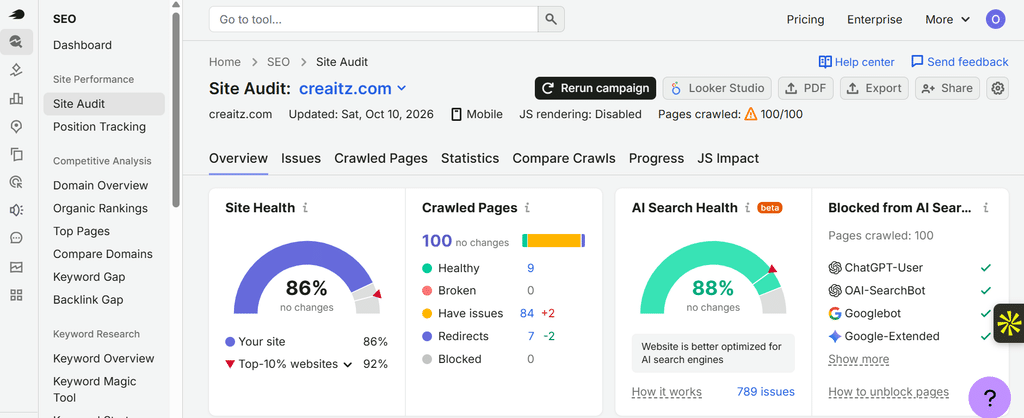
Where available, use the AI search health report to also identify restrictions affecting supported AI bots, including robots.txt blocks.
If the report identifies a block, compare it with your intended policy. An accidental restriction needs investigation; a deliberate training restriction may not need changing.
If the audit finds no problem, do not conclude that every real AI crawler has access. You have established what the audit observed—not a universal pass.
Test the Response, Not Just the Status Code
A developer or hosting provider should investigate suspected restrictions at the security layer.
Check:
- The response status
- Redirects
- Whether the expected page content is returned
- Challenge or verification pages
- Firewall events and server logs
- The request’s time, source and user agent
A 200 OK response can still contain a challenge page rather than the article. A 403 response signals refusal, but further investigation is needed to identify the rule responsible.
Semrush’s audit settings support an OpenAI-Search user agent for a diagnostic crawl.
However, changing a user-agent string does not turn an audit request into a genuine OpenAI request. A firewall may also evaluate IP addresses, verified-bot identity and other signals.
Treat simulated requests as clues. Confirm the diagnosis using security events, logs and the crawler provider’s verification guidance.
Fix the Narrowest Problem
If an unintended firewall rule is responsible, ask your developer or security provider to adjust that rule rather than disable protection across the website.
Use the provider’s supported verification methods. A user-agent name alone is not a safe basis for trusting a request.
After the change:
- Retest the affected public URL.
- Confirm that the expected content is returned.
- Review whether genuine crawler requests succeed.
- Rerun the technical audit.
- Document what changed.
For digital marketers, this documentation makes the handover useful. “AI cannot see us” becomes a specific request: which page, which request, what response and which rule needs review.
Keep Monitoring After the Fix
Schedule repeat audits and record changes to hosting, security plugins and CDN settings.
Semrush Position Tracking can provide a separate view of ranking movements. Search Console and analytics can help investigate changes in impressions, clicks and business outcomes.
These signals support the investigation, but a ranking decline does not identify a firewall rule—and restored access does not guarantee a citation.
You can begin with Semrush’s SEO Toolkit 7-day free to audit priority pages and establish repeatable technical checks.
Semrush helps surface technical findings. Firewall logs and verified crawler requests remain important when confirming bot-specific access.
Access is a Prerequisite—not a Visibility Guarantee
The brief’s strongest lesson is not that firewalls explain every missing AI mention.
They do not.
Relevance, source selection, competition and reporting coverage also affect what you observe. There is no basis here for calling infrastructure blocks the most common cause of AI invisibility.
Check that the intended crawler can retrieve the intended content before spending weeks optimising it.
For digital talents, this is where marketing and technical skills meet. Ask the right question, collect evidence and make a targeted correction.
A healthy page is not merely one that opens in your browser. It is one that returns the right content to the audiences and systems you deliberately choose to serve.
Disclosure: This article contains affiliate links. If you purchase through them, Creaitz may earn a commission at no additional cost to you.
