

Affiliate disclosure: This article contains affiliate links to Semrush. If you sign up through them, Creaitz may earn a commission at no extra cost to you.
Your search traffic falls. You check the industry news and discover that Google has released two updates within days of each other.
Suddenly, every explanation sounds plausible.
Was it your content? Your backlinks? A technical change? Has a larger competitor taken your place?
For freelancers managing client websites and marketers responsible for reporting results, the pressure is familiar: explain the decline quickly, then present a recovery plan.
But a Google update traffic drop is an observation that needs investigation.
Before rewriting your website, establish what changed and what the available evidence can actually tell you.
Establish When the Traffic Decline Began
Google released two updates within three days in March 2026. The spam update ran from March 24 to March 25, followed by the core update from March 27 to April 8.
The close timing makes attribution difficult. A website losing visibility during this period could also have experienced technical changes, stronger competition or shifts in search demand.
Record when the decline began, which pages were affected and what changed on your website around the same time. Comparing those details with Google’s rollout dates will help you narrow the investigation.
How to Investigate the Drop Without Panic-Editing
1. Put Google’s Dates Beside Your Own Changes
Create a short record containing:
- The official update start and completion dates.
- When the decline first appeared.
- Recent website releases, migrations or plugin changes.
- Changes to tracking, consent settings or analytics tags.
- Promotions or seasonal events affecting demand.
Imagine you manage a training website. Search visits to its course pages fall shortly after a theme update, while the blog remains stable.
That pattern gives you a specific lead: investigate what changed on the course template before assuming the whole website needs new content.
Google recommends waiting at least a full week after a core update completes before assessing its search impact. That does not mean waiting to repair a broken form or an accidental indexing restriction.
2. Establish What Actually Fell
“Traffic is down” can describe several different problems.
Compare the affected pages in Search Console and your analytics:
- Did search impressions decline?
- Did clicks fall while impressions remained relatively stable?
- Did relevant rankings change?
- Did analytics sessions fall without a similar change in Search Console clicks?
- Were qualified enquiries or registrations affected?
These patterns suggest different investigation paths. They are clues, not automatic conclusions.
Use Semrush’s Position Tracking to review daily movements for your tracked keywords. Keep the location, device and keyword set consistent when comparing periods.

For the training website, separate course-related terms from informational blog searches. A site-wide average can hide the section that needs attention.
3. Check for Problems You Can Verify
Before commissioning twenty rewrites, check whether the affected pages work as intended.
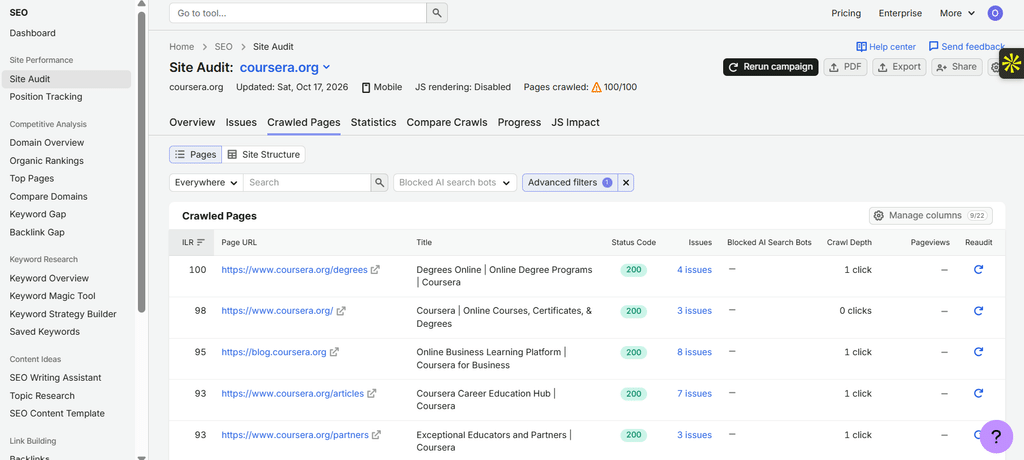
In Site Audit, investigate relevant errors involving broken links, crawlability, indexability and page responses.
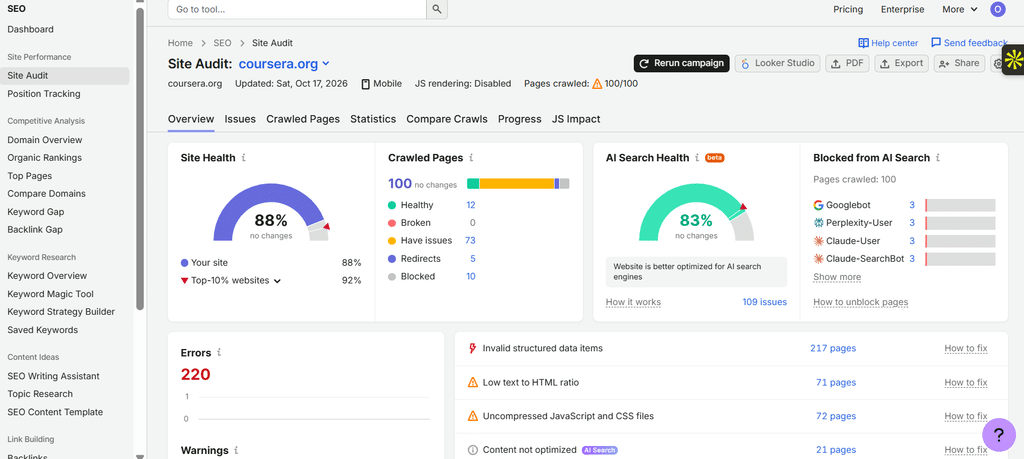
Open the affected URLs and confirm the issue rather than treating every warning as the explanation for lost traffic.
Also review Search Console’s Manual actions and Security issues reports.
A manual action is issued following human review; it is not the same thing as an algorithmic ranking change. An empty Manual actions report does not establish that your website was unaffected by an automated update.
If you find an accidental noindex instruction on course pages after the theme release, fix that verified problem. You do not need an elaborate theory about Google’s preferences first.
4. Inspect the Pages That Replaced Yours
When rankings decline, look at the results now appearing for the affected searches.
Semrush’s Organic Rankings can help identify competitor position changes and pages worth examining. Semrush estimates competitors’ organic traffic using keyword rankings and expected click-through rates.

Then inspect the pages themselves.
For a course-related search, are users now seeing course directories, individual providers, comparison articles or videos? Does the replacement page answer a different interpretation of the query?
Avoid assuming that every large publisher outranking you is practising “parasite SEO.” Google’s site reputation policy concerns particular uses of third-party content to exploit a host’s established ranking signals—not simply the presence of a powerful domain.
Use competitor research to identify differences in page format, search intent and information quality that warrant closer investigation.
5. Turn the Evidence Into a Prioritised Response
Separate your findings into three groups:
- Confirmed Problems: Repair verified technical faults or address an identified manual action.
- Supported Improvement Opportunities: Strengthen pages where inspection reveals missing information, unclear purpose or a poor match to the search.
- Unresolved Observations: Continue monitoring when the evidence does not yet support a specific explanation.
Record what you change and why. Avoid combining a redesign, URL migration and site-wide rewrite into one hurried recovery project.
For client reporting, replace “Google penalised us” with something more defensible:
“The decline began near the update period and is concentrated on course pages. We found a template issue, corrected it and are monitoring those URLs separately. The update’s contribution remains uncertain.”
That is not an evasive answer. It distinguishes what you know from what you are still testing.
Your recovery plan needs evidence. You can try Semrush One free for seven days to build ranking baselines, inspect technical issues and research competitors—before putting the entire website on trial.
