

Affiliate disclosure: This article contains affiliate links to Semrush. If you sign up through them, Creaitz may earn a commission at no extra cost to you.
You check your Google rankings, update your articles and monitor Search Console. But when did you last inspect your website in Bing?
Your important pages may perform differently across Google, Bing and AI-generated answers. Checking each discovery surface helps you identify gaps in your reporting.
Bing SEO for AI visibility starts with a few concrete checks: whether Bing indexes your priority pages, how those pages perform for relevant searches and where they receive AI citations.
You can begin with five pages that support your services, resources or customer enquiries.
What the 87% Citation Finding Actually Shows
Seer Interactive examined more than 500 ChatGPT search citations across approximately 100 questions. More than 87% matched Bing’s top 20 organic results for the same questions, compared with 56% for Google.
Published in February 2025, the study also acknowledged its limited sample and noted that many questions included “best” or “top.” Some cited sources did not match the Bing results collected.
The finding gives marketers a reason to investigate Bing. It does not establish that:
- Every ChatGPT answer relies on Bing.
- Ranking in Bing guarantees a citation.
- A page absent from Bing can never appear in ChatGPT.
- The same percentages apply to every industry or today’s results.
Use the finding as a reason to include Bing in your visibility checks. Validate its relevance against your own pages, audience and current results.
Start With Five Important Pages
Avoid turning this into an immediate site-wide project.
Choose five public pages that support your goals. For a digital professional, these might include:
- Your homepage
- A service page
- A portfolio or case study
- A useful tutorial
- A course or resource page
In Bing Webmaster Tools, use URL Inspection to check each page’s index status and available crawl information.
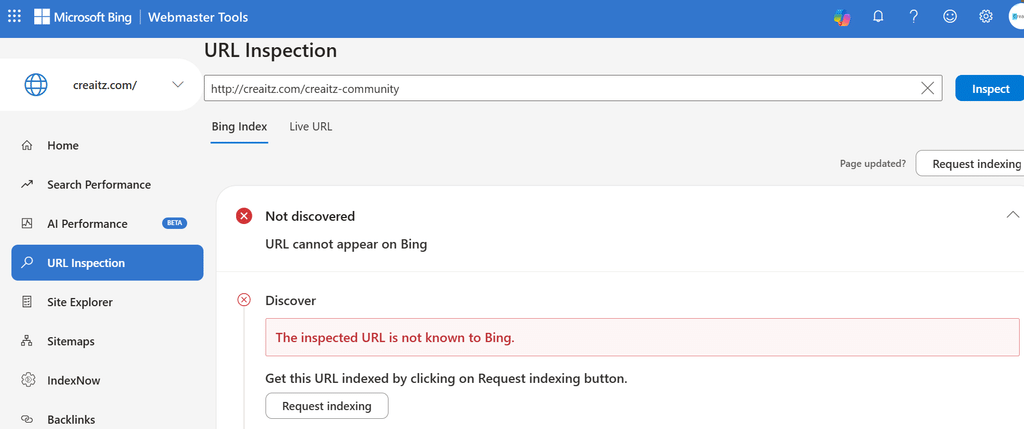
The tool can show discovery, crawling and indexing details, along with relevant errors. Its Live URL feature lets you investigate the current response separately from information already held in Bing’s index.
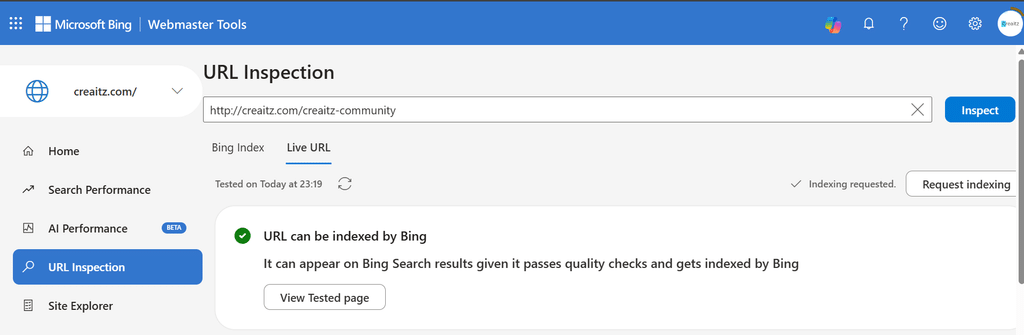
Record the page’s reported index status separately from its live accessibility.
Where Bing identifies an issue, investigate the cause, apply the relevant correction and request indexing if appropriate. Bing will still assess the page for inclusion.
Monitor Bing SEO for AI Visibility
Once you understand indexing, investigate search visibility.
Suppose you publish tutorials for beginner designers. Select a small group of relevant terms, such as “design portfolio examples” or “freelance designer portfolio.”
In Semrush’s Position Tracking, add a Bing target if your plan supports another target. Choose from the location, language and device settings available for Bing.
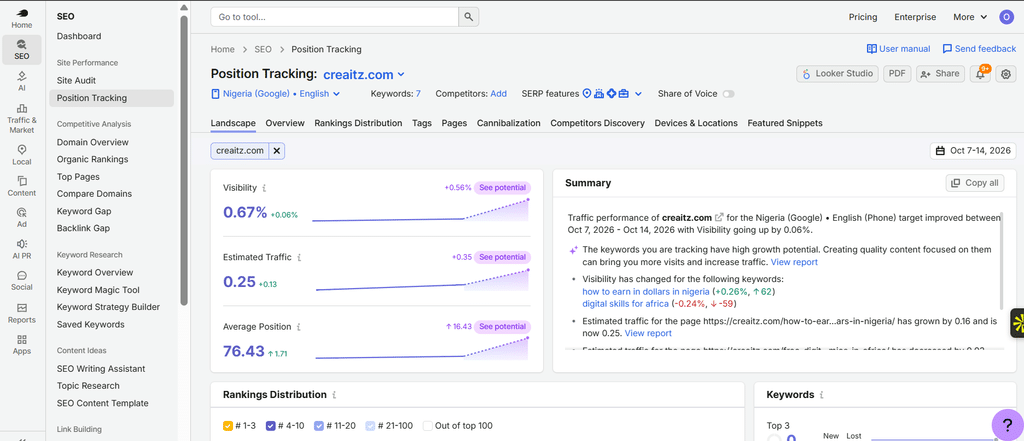
Review which URLs appear and which competitors rank for those terms.
If a page has no recorded ranking, check its index status, relevance and competing results separately. Each check addresses a different possible explanation.
Review Your Recorded AI Citations
Bing Webmaster Tools also offers an AI Performance report covering citation activity across Microsoft Copilot, AI-generated summaries in Bing and select partner integrations.
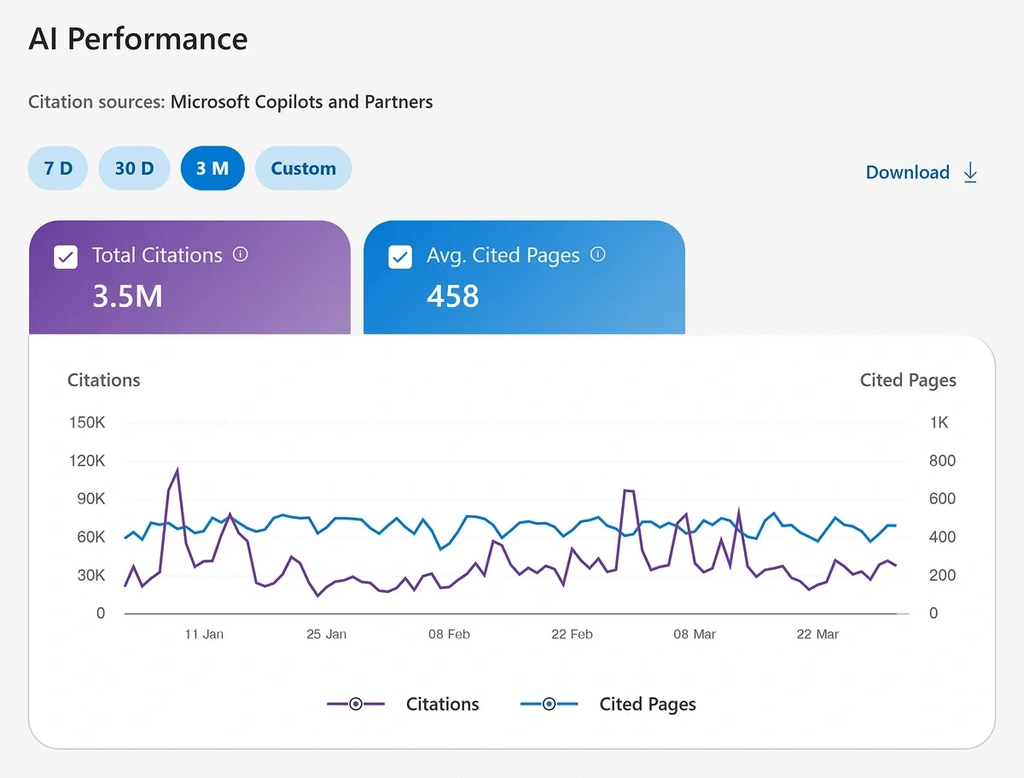
It shows cited pages, citation trends and associated grounding-query phrases.
Grounding-query phrases summarise aggregated, sampled citation activity. The report covers supported Microsoft experiences and select partner integrations, with limited visibility into individual answers.
Our guide to Bing AI Performance explains the measures, grounding-query views and newer Topics Portfolio feature.
If your report has no data, check again as activity develops. Sparse citation activity may fall below the reporting threshold.
Connect the Evidence Without Combining the Metrics
Keep a simple record for each priority page:
| Check | What it tells you |
| Bing URL Inspection | What Bing reports about indexing and crawling |
| Bing Position Tracking | Rankings for your selected keywords and settings |
| AI Performance | Recorded citations across supported Microsoft and partner experiences |
| AI prompt monitoring | Observed appearances for selected prompts and platforms |
| Website analytics | Visits and measurable actions on your website |
You can try Semrush One free for seven days to investigate traditional rankings alongside AI visibility. It combines the SEO Toolkit and AI Visibility Toolkit.
Record rankings, citations, website visits and customer enquiries as separate measures so you can see what each contributes.
Give Bing a Place in Your Routine
Add Bing to your existing website review. Start with five important pages, record their index status and establish a baseline for relevant rankings and available citations.
Use your findings to choose the next action: resolve a crawl issue, improve an explanation or investigate a page receiving unexpected attention.
Revisit the same pages regularly. Over time, you will build a clearer picture of how people can discover your work across search and AI experiences.
