

Affiliate disclosure: This article contains affiliate links to Semrush. If you sign up through them, Creaitz may earn a commission at no extra cost to you.
Your blog explains how to price freelance work.
The reader finishes, opens a spreadsheet and searches for a pricing template somewhere else.
You answered the question. Another website helped them do the work.
That gap is worth examining—whether you run a digital-skills community, a marketing agency or a personal brand.
A destination website gives people a reason to arrive intentionally, accomplish something useful and return when they need it again. Its value does not end at the final paragraph.
Is Google really favouring “destination” websites?
Be careful with sweeping explanations of algorithm updates.
Google’s published guidance focuses on helpful, reliable, people-first content. It asks whether a website serves an intended audience, helps visitors achieve their goals and offers something worth bookmarking or recommending. That is not an announcement that publishers must become software companies.
Likewise, a competitor gaining visibility does not prove its calculator, community or service offering caused the improvement.
Still, the underlying business question is useful:
If search traffic disappeared tomorrow, what would someone deliberately visit your website to use?
Find the task hiding inside your content
Start with a recurring reader problem rather than a fashionable feature.
A person reading about freelance pricing may need to prepare a quote. Someone researching marketing careers may need to compare skills against real job requirements. A creator exploring sponsorships may need to organise their media kit.
Match the article to a useful next step:
| Reader’s question | Resource worth testing |
| How should I price this project? | An editable project-scoping worksheet |
| Am I ready to apply for this role? | A skills checklist with evidence requirements |
| What should go in my media kit? | An annotated example and editable template |
| How do I brief a designer? | A structured brief builder or downloadable form |
These are illustrative ideas, not resources Creaitz is claiming to have launched.
The test is simple: does the resource reduce effort or uncertainty after the explanation ends?
Use competitors to investigate
Before building anything, examine what already serves that audience.
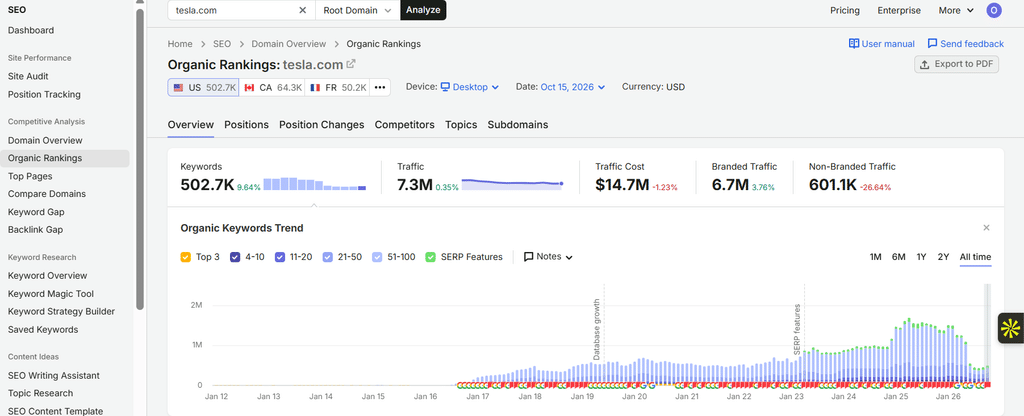
In Semrush’s Organic Rankings, review relevant competitors’ keywords, position changes and top pages. Its reports use Google ranking data and estimated traffic, making them useful for identifying pages to investigate—not for seeing competitors’ actual analytics or proving why they rank.
The screenshots below use Tesla for Organic Rankings and Coursera/Udemy for Keyword Gap as tool demonstrations.
Open the pages themselves. Ask:
- Is the useful part an article, template, directory or interactive tool?
- Can visitors complete a task without searching elsewhere?
- Are examples and instructions specific enough to use?
- What remains frustrating, confusing or unnecessarily complicated?
Then use Keyword Gap to explore related demand your website may not cover. Its organic comparison identifies ranking differences between domains; it does not automatically prescribe a new product or resource.
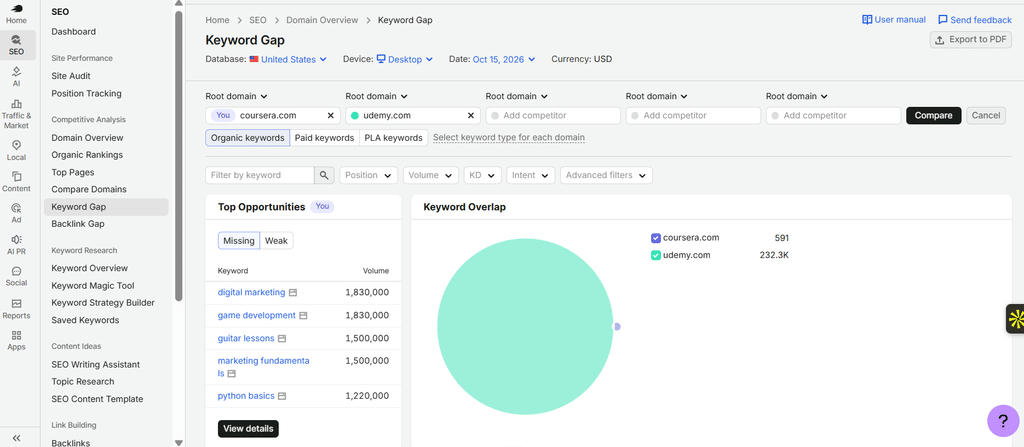
A keyword gap is a research lead. Your audience still gets the deciding vote.
Build the smallest genuinely useful version
You probably do not need a developer sprint to test the idea.
For the freelance-pricing example, begin with a worksheet covering scope, estimated hours, revisions, expenses and payment milestones. Explain its assumptions and limitations. Avoid presenting suggested figures as universal market rates.
Ask a few intended users to apply it to a realistic project.
Where do they hesitate? Which fields require explanation? Does the worksheet help them produce a clearer quote?
Improve those points before adding logins, automation or a dashboard with fourteen tabs.
A spreadsheet that solves a problem is more useful than a “platform” that introduces three new ones.
Keep essential guidance accessible on the page. Requiring an email address before visitors can understand the resource’s value may create unnecessary friction.
Connect the resource to the right articles
Do not leave your useful resource stranded in the navigation.
Link to it where readers encounter the problem it solves. A pricing article can introduce the scoping worksheet after explaining how deliverables affect a quote.
The resource page should also work independently. Explain who it is for, how to use it, its limitations and when it was last reviewed.
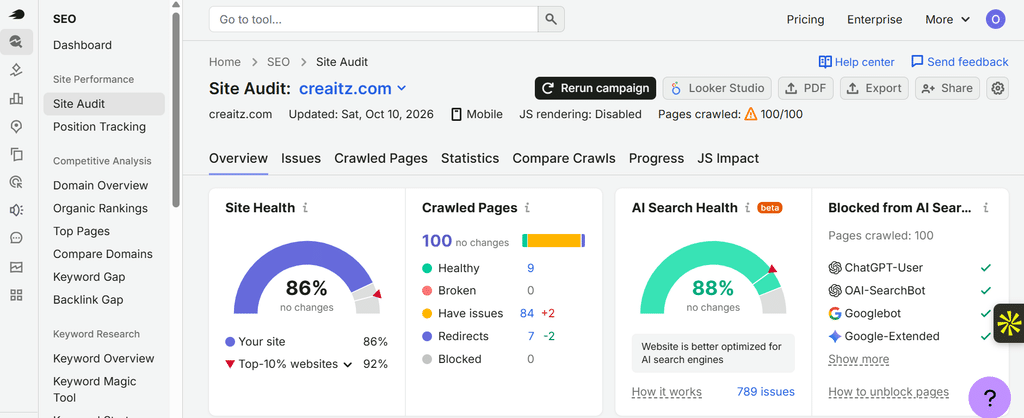
Use Site Audit to check supporting technical issues such as broken internal links and crawlability problems, then repeat the audit after changes.
Judge the experiment by usefulness—not novelty
Choose one meaningful action before launch: completing the worksheet, downloading the template or submitting a properly scoped enquiry.
Review that action alongside user feedback and relevant search performance. A download alone does not prove the resource helped, and increased rankings do not establish which change caused them.
If you are responding to a core-update decline, avoid treating this as an instant recovery tactic. Google recommends assessing affected pages carefully, avoiding quick fixes and allowing time for meaningful improvements to be recognised.
The goal is not to decorate a content site with tools. It is to make the website more useful to the people it already wants to serve.
Before commissioning another twenty posts, give your existing visitors one fewer reason to open another tab.
If competitor research is where you need to start, you can take Semrush One for a free seven-day trial—a little reconnaissance before another content marathon.
It combines the SEO and AI Visibility Toolkits; features and limits depend on the plan, and improved rankings are not guaranteed.
