
The second question often tells you what someone needs before they can make a decision.
“How much does a website cost?” opens the conversation. “What if I already have the design?” reveals an existing investment. “Can I update it myself afterwards?” brings maintenance and ownership into view.
If you sell digital services, those details help you explain your offer, qualify an enquiry and anticipate concerns.
Google now makes that conversation easier to continue inside Search. Your content needs to support the questions that emerge as someone works through their options.
Affiliate disclosure: This article contains affiliate links to Semrush. If you sign up through them, we may earn a commission at no extra cost to you.
Where the Search Becomes a Conversation
In its January 2026 announcement, Google introduced the ability to ask a follow-up question directly from an AI Overview and continue into AI Mode on mobile, globally.
The transition preserves context from the AI Overview. You can explore a topic further without rebuilding your question from scratch.
For your business, this creates additional moments when a prospective customer may encounter an explanation, recommendation or source.
A useful answer to the opening question may leave several practical concerns unresolved. As the conversation develops, someone might introduce their budget, location, existing tools or deadline. Each detail changes the information they need.
Your content planning can account for those changes.
Map AI Mode Follow-Up Questions Around Customer Decisions
Choose one service or product you want to explain more clearly. Review the questions you already receive through enquiries, discovery calls, comments and support messages.
Arrange them into a sequence:
| Decision stage | Question you might receive | Information your content should provide |
|---|---|---|
| Exploring | Do I need a website for my business? | Relevant use cases, ongoing responsibilities and likely requirements |
| Comparing | Should I choose a website builder or hire a developer? | Control, maintenance, complexity and support |
| Checking suitability | Can you work with the design I already have? | Accepted design files, review process and implementation requirements |
| Reducing uncertainty | Who updates the website after launch? | Training, access, maintenance options and ownership |
| Taking action | What do you need before you can quote? | Project scope, required assets and the next step |
This gives you a starting map for a website-development service. You can build an equivalent sequence around your own offer using the language your customers use.
Prioritise the questions that repeatedly delay a decision. A concern about account ownership may deserve attention before another broad introductory article.
Our guide to building a GEO content strategy explains how to select an existing page for that work.
Keep Each Answer Useful on Its Own
Read the section where you explain your service scope. Could someone understand it without reading the entire page?
An answer about post-launch access should identify the accounts involved, the permissions you provide and any ongoing support arrangements. State conditions wherever they affect the answer.
Keep related explanations close together. A maintenance section can link naturally to your support terms. A pricing explanation can direct readers to the information needed for a quote.
You can also use descriptive headings that reflect genuine customer questions.
Google’s guidance on AI optimisation says you do not need a special chunking strategy or schema specifically for AI Search. Clear structure helps readers navigate your information; citation outcomes still require observation.
Observe the Conversation as It Develops
Run a small manual review in AI Mode using a realistic opening question. Continue with two or three questions that follow naturally from the answer.
Record:
- The opening question and subsequent follow-ups.
- Any constraints you introduce.
- Whether your brand is mentioned.
- Whether your website is cited.
- Which other pages appear as sources.
- Any inaccurate or incomplete claims.
Keep the sequence together in your notes. “Can I manage it myself?” carries a different meaning after a discussion about websites than after a discussion about paid advertising.
Repeat selected sequences periodically. Your observations provide examples of how answers develop under those conditions.
For consistent monitoring of individual questions, Semrush’s Prompt Tracking supports custom prompts in Google AI Mode, ChatGPT Search and Gemini, with daily updates and saved response snapshots.
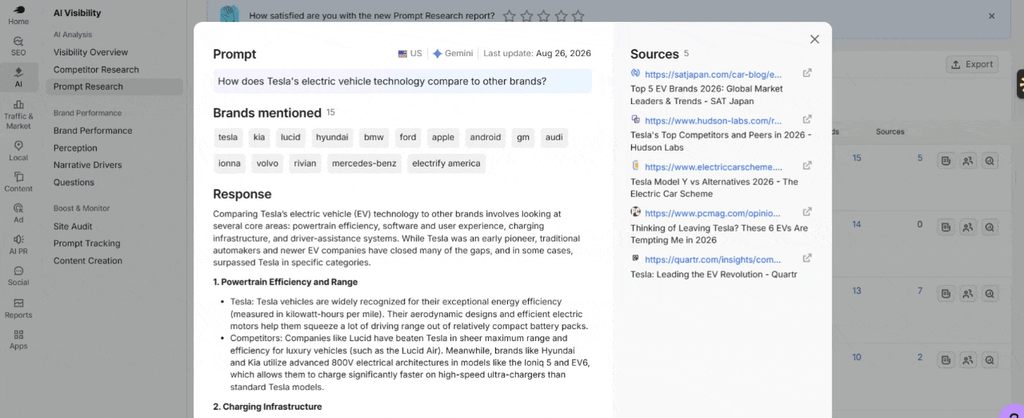
Keep that monitoring alongside your manual conversation review. A tracked individual prompt gives you a repeatable checkpoint; a multi-turn session lets you inspect the context carried between questions.
Review AI Mode Follow-Up Questions After You Update a Page
Record the page changes and publication date. Revisit the relevant questions and inspect the answers and cited sources over time.
You can use Semrush One to access the SEO and AI visibility toolkits while you monitor your search presence for free for seven days.

You can try it free for seven days. Give your next content update a little evidence to work with.
Keep enquiries, qualified leads and sales in your business reporting. An appearance in a sampled AI answer shows visibility in that response. Revenue attribution requires additional evidence.
Our article on AI search reporting explains how to interpret visibility data and document its limits.
Leave Room for the Next Question
A customer’s understanding develops throughout a conversation. Your content can help them move from a broad interest to a clearer view of suitability, cost, responsibilities and the next step.
Start with one offer and the questions you already hear. Improve the relevant explanations, connect them through useful internal links and review how those answers appear in search.
You will leave customers better prepared to enquire—and give yourself a clearer basis for deciding what to improve next.
