
Affiliate disclosure: This article contains affiliate links to Semrush. If you sign up through them, Creaitz may earn a commission at no extra cost to you.
Your website traffic drops, but enquiries continue.
One prospect says they discovered you through an AI assistant. Another remembers reading your advice but cannot recall where. Analytics records a visit, yet the conversation that influenced the purchase remains invisible.
Should you cut the content budget or argue that your articles are working without clicks?
Neither conclusion follows automatically.
Your analytics, enquiry forms and sales records capture different parts of a customer’s journey. An AI recommendation or an article read inside a search result can leave gaps between those records.
Zero-click attribution examines how you collect evidence of influence when someone encounters your information without visiting its source.
You can begin with three records: observed website activity, customer-reported discovery and confirmed business outcomes. Keeping them clearly labelled helps you evaluate content performance and explain uncertainty in your reporting.
Separate Three Different Questions
Before building another dashboard, distinguish:
- Was our content visible?
- Did someone visit or contact us?
- Did that contact become a valuable customer?
A citation can help answer the first question. A tracked website action can help answer the second. Your sales records help answer the third.
None of these automatically answers all three.
If an AI answer references your article, you have evidence of an observed appearance. You do not necessarily know who saw it, whether they noticed your brand or whether it influenced a purchase.
Choose the Business Action for Your Zero-Click Attribution Review
Choose the action that supports your business goal. If you sell design services, you might track qualified project enquiries. If you run a paid community or course, you might track completed purchases.
Define what counts as a successful action before interpreting your traffic figures.
In Google Analytics, a key event measures an action important to your business. Reports can show recorded key events and attribute credit to touchpoints in the measured journey.
Configure the event to fire after the action succeeds, and test the complete journey.
Record a WhatsApp link click as an attempt to open a conversation. Confirm sent messages, qualified enquiries and customers through the records available in your messaging or sales workflow.
Keep personal details such as names, email addresses and message contents out of analytics event parameters.
Ask Customers What Your Dashboard Cannot
Add an optional question to your enquiry form or intake conversation:
How did you first hear about us?
Then, where appropriate, ask:
Was there an article, video, recommendation or tool that helped you decide to contact us?
The questions serve different purposes. Someone may discover you through a community recommendation and later use your website to evaluate the offer.
Preserve the customer’s wording. If they say “I think it was ChatGPT,” record that uncertainty rather than upgrading it to a confirmed AI-generated lead.
Label these answers as customer-reported evidence and preserve any uncertainty in the customer’s wording.
Keep a Small Lead-Evidence Log
You do not need an enterprise attribution system to begin.
Use a spreadsheet or CRM with separate fields:
| Field | What to record |
| Recorded website source | The source available in analytics or your form system |
| Customer-reported discovery | Their answer, including uncertainty |
| Content mentioned | A specific article, video or resource, if identified |
| Lead quality | Whether the enquiry fits your service |
| Outcome | Open, won, lost or not qualified |
| Confirmed revenue | Actual revenue, recorded separately from potential deal value |
Link records using an appropriate internal reference rather than exposing personal information in public reports.
Keep the recorded website source and customer-reported influences in separate fields so both remain available during your review.
Add Search Visibility to Your Evidence
If traffic declines, investigate whether search visibility changed too.
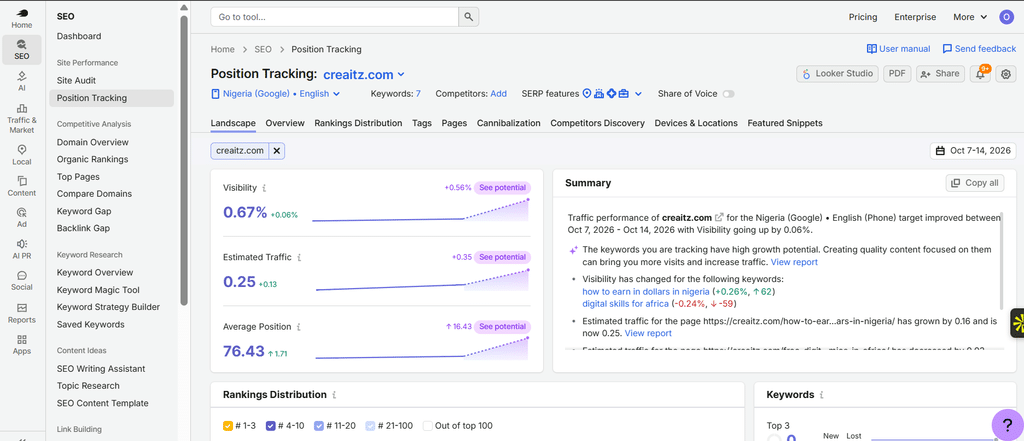
In Semrush’s Position Tracking, review selected keywords and landing pages over time. These observations can help identify where rankings moved, but they do not explain every traffic change.
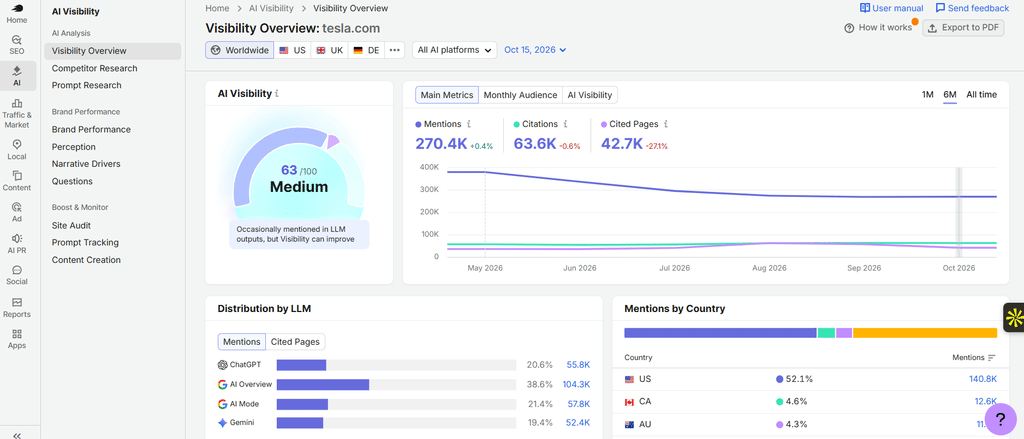
Then use Visibility Overview to inspect available AI responses, brand mentions and cited pages. Record the platform and update date so the evidence remains tied to what the report actually observed.
You can try Semrush One free for seven days to review traditional rankings alongside supported AI visibility data.
Label these findings as visibility observations. Our AI search reporting guide explains how to interpret platform reports and keep their definitions clear.
Write a Report That Admits What Is Unknown
A good illustrative reporting example might read:
Organic visits declined during the reporting period. We also observed our article cited in a monitored AI response. Some prospects reported AI-assisted discovery, but we cannot establish how many enquiries resulted from that citation. Qualified leads and confirmed sales are reported separately.
Before changing your investment, check tracking accuracy, seasonality, demand, rankings and lead quality. Review citation trends alongside qualified enquiries and confirmed sales.
Improve the Evidence Before Expanding the Claim
Build your zero-click attribution review around evidence you can identify and explain.
Start with a tested business-action event, two customer-discovery questions and a small lead-evidence log. Add relevant search observations and preserve the source of each finding.
Over successive reporting periods, review which content customers mention, which enquiries fit your offer and which opportunities become sales. Document the gaps that remain.
This gives you a consistent basis for deciding what to maintain, improve or investigate—and helps you explain those decisions to clients or colleagues.
