

Affiliate disclosure: This article contains affiliate links to Semrush. If you sign up through them, Creaitz may earn a commission at no extra cost to you.
You publish a useful article, submit your sitemap and wait. Later, Google Search Console shows an unsettling status:
“Crawled — currently not indexed.”
Should you rewrite the article, request indexing again or delete the page?
Google Search Console’s “Crawled — currently not indexed” status gives you a starting point for reviewing a page’s indexing history, technical setup and usefulness.
But before changing the content, inspect the affected URL and compare it with related pages on your website. You can then decide whether it needs a technical correction, a more complete explanation or consolidation with an existing resource.
This guide walks you through those checks so you can choose an action based on the page’s purpose and the available evidence.
What “Crawled—Currently Not Indexed” Means
Google’s explanation is straightforward: it crawled the page but did not index it. The page may or may not be indexed later, and Google says there is no need to resubmit that URL for crawling.
Review the URL’s indexing details to investigate possible causes, including technical signals, overlapping content and the page’s usefulness.
Check the exact status before proceeding.
“Discovered — currently not indexed” means Google knows about the URL and has yet to crawl it.
Investigate Your Crawled—Currently Not Indexed Pages
In Search Console, open Indexing → Pages and select the relevant reason. Choose a few affected URLs that you genuinely want indexed.
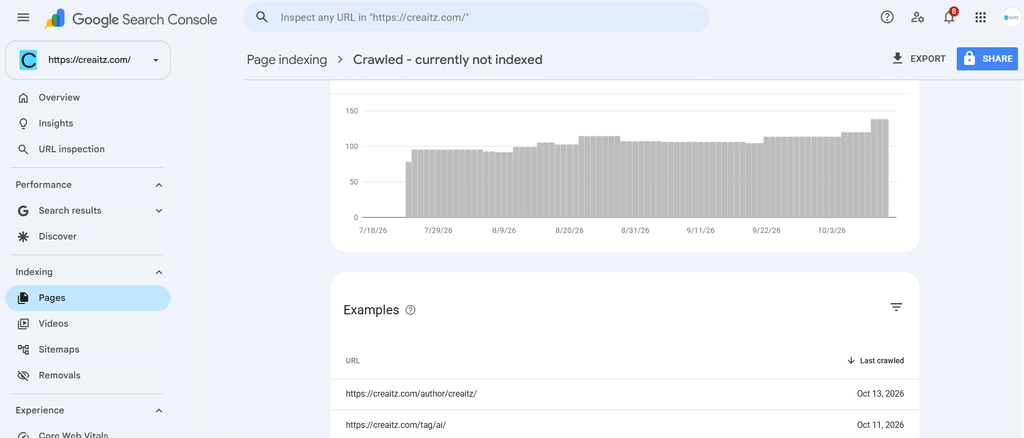
Choose pages that support your goals, such as a service page, a case study or a tutorial answering a recurring customer question.
Inspect each URL. Review the last crawl, available indexing details and canonical information. Use Test live URL to investigate the current page, remembering that the live test and Google’s stored indexing information describe different things.
Record:
- The page’s purpose
- Its reported status and crawl date
- Any recent changes
- The preferred canonical URL
- Whether another page already serves the same need
Prioritise URLs you want people to find through search. Duplicate versions may be intentionally excluded when another URL serves as the preferred page.
Separate Technical Findings From Editorial Questions
Next, examine whether your website sends confusing or restrictive signals.
Run Semrush’s Site Audit and review findings associated with your sample pages.
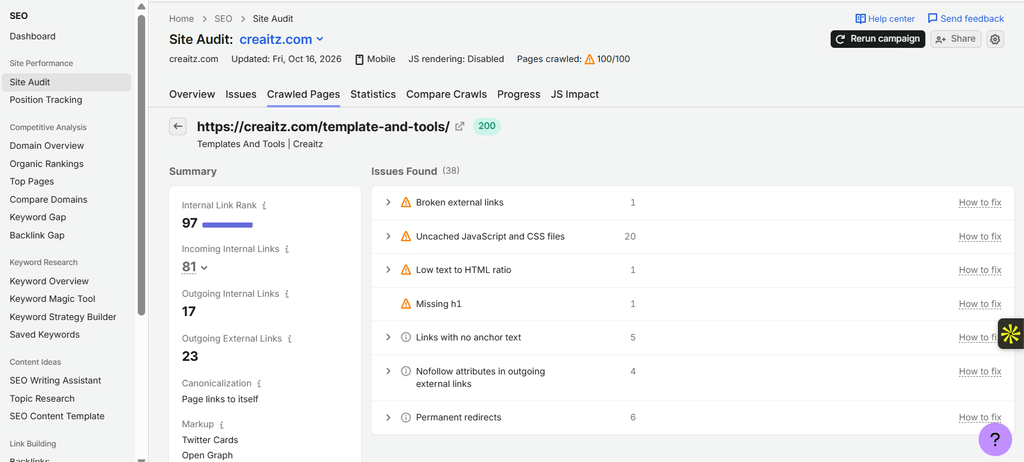
Its checks cover duplicate content, broken links, crawlability and indexability within your configured crawl scope.
Compare the findings with Search Console and inspect the affected pages. Investigate canonical conflicts as technical issues; review nearly identical tutorials together to decide whether each serves a distinct purpose.
Treat the Site Health score as a summary of the checks performed. Establishing why Google excluded an individual page requires further investigation.
Ask What the Page Adds
Suppose your website has separate articles titled:
- How to Start Freelancing
- Freelancing for Beginners
- A Beginner’s Guide to Freelancing
Different titles do not necessarily mean different reader needs.
Read the pages together. Do they provide distinct guidance, or repeat the same advice with different introductions?
For a page worth retaining, strengthen what makes it useful:
- A documented process
- An original example
- A clearly explained limitation
- Current, sourced information
- Evidence that supports its recommendations
On Page SEO Checker provides competitor-based content, semantic and technical recommendations for selected pages. Review each suggestion against your page’s purpose and verify the evidence before making changes.
You can try Semrush One free for seven days to bring technical auditing and page-level research into your review.
Our guide to original content in SEO explores how firsthand evidence and useful examples can strengthen an existing article.
Review How AI-Assisted Content Was Checked
Google’s guidance warns that generating many pages without adding value may violate its scaled content abuse policy. It also stresses manual fact-checking and review of AI-generated material.
Review the page’s accuracy, purpose and contribution to your existing coverage. Verify its claims, inspect its examples and check whether it answers a distinct reader question.
Our AI content audit guide explains how to review published batches and assign each page a clear next action.
Improve, Consolidate or Remove—with a Reason
Choose an action based on the evidence:
| Finding | Possible next step |
| Useful page with a technical issue | Correct the issue and verify the result |
| Useful topic with incomplete guidance | Improve the existing page |
| Several pages serving the same purpose | Consider consolidation and appropriate redirects |
| Obsolete page with no continuing purpose | Consider removal after checking links and user needs |
| Intentionally excluded duplicate | Confirm the setup is working as intended |
Do not delete pages merely because they lack traffic or appear in an exclusion report.
For smaller sites, avoid assuming crawl budget is the main problem. Google’s detailed crawl-budget guidance primarily addresses large or rapidly changing sites and sites with substantial discovery backlogs.
Make Indexing Review Part of Publishing
Record your chosen action, the affected URLs and the date of each change. Recheck the indexing information after Google has had time to revisit the pages.
Add these checks to your publishing routine: confirm each page’s purpose, verify its technical accessibility and review how it fits alongside existing content.
A small, documented review gives you a clearer basis for improving, consolidating or removing a page. Keep the findings so your next decision builds on what you have already learned.
